Apple Watch Sleep Apnea Detection: What you need to know

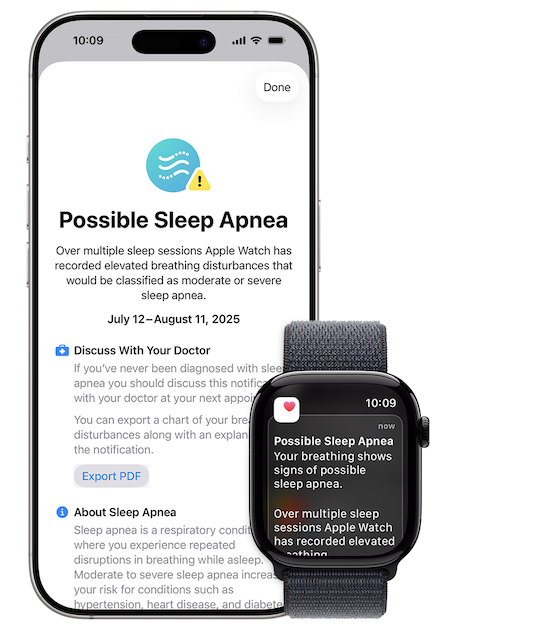
An Apple Watch Series 9 or later, Apple Watch Ultra 2, or Apple Watch SE 3 with the latest version of watchOS now includes an FDA-cleared sleep apnea detection feature that could help millions of undiagnosed Americans identify potential breathing problems during sleep.

apple watch sleep apnea

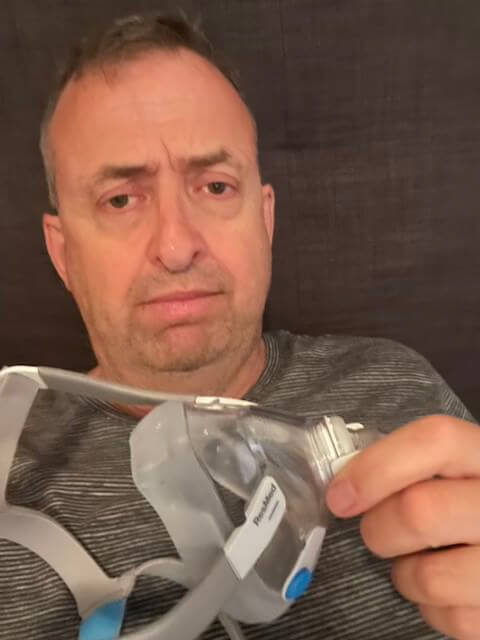
As someone who lived with undiagnosed severe sleep apnea for years, I’m excited about any technology that makes detection easier and more accessible.

But here’s what you need to know right away: The Apple Watch sleep apnea feature is a screening tool, not a diagnostic device. If it alerts you to potential sleep apnea, you’ll still need a proper medical test to get an official diagnosis and treatment. That’s where solutions like the WatchPAT One home sleep test come in—providing the FDA-cleared diagnosis you need to start treatment.

In this comprehensive guide, I’ll explain exactly how Apple Watch sleep apnea detection works, what it can and cannot do, how accurate it is, and most importantly, what to do if you get an alert. Let’s dive in.

What Is Apple Watch Sleep Apnea Detection?

Apple Watch sleep apnea detection is an FDA-cleared feature that monitors your breathing patterns while you sleep and alerts you if it detects consistent signs of moderate to severe sleep apnea. The feature became available in September 2024 after receiving FDA 510(k) clearance on September 13, 2024.

Which Apple Watch Models Support Sleep Apnea Detection?

The sleep apnea notification feature is only available on these models:

  • Apple Watch Series 9
  • Apple Watch Series 10
  • Apple Watch Ultra 2

Even though the feature is built into watchOS 11, older Apple Watch models (Series 6, 7, 8) cannot use sleep apnea detection due to hardware limitations.

Who Can Use This Feature?

The sleep apnea detection is intended for:

  • ✅ Adults 18 years or older
  • ✅ People without a prior sleep apnea diagnosis
  • ✅ Users who want to screen for moderate to severe obstructive sleep apnea

The feature is not intended for:

  • ❌ People already diagnosed with sleep apnea
  • ❌ Users under 18 years old
  • ❌ Diagnosing sleep apnea (screening only)

My Personal Journey with Sleep Apnea

Before diving into the technical details, I want to share my personal experience. I had severe sleep apnea for years before I was officially diagnosed. I used to wake up feeling more tired than when I went to bed, and my energy levels would dip drastically throughout the day.

Looking back, I had all the classic symptoms of sleep apnea:

  • Chronic loud snoring
  • Witnessed breathing pauses (my wife counted them)
  • Severe daytime fatigue
  • Morning headaches that disappeared after starting CPAP
  • Brain fog and poor concentration
  • Mood swings and irritability

After my diagnosis through a home sleep test, I started using a CPAP machine, which completely transformed my life. My energy improved, the migraines I used to suffer from disappeared almost overnight, and I finally felt like myself again.

Having experienced the life-changing effects of sleep apnea treatment firsthand, I understand the importance of early detection. If technology like the Apple Watch can prompt even one person to get properly tested and treated, it’s a win for public health.

How Apple Watch Sleep Apnea Detection Works

Unlike traditional sleep studies that monitor brain waves, oxygen levels, and respiratory effort with multiple sensors, Apple takes a much simpler approach using just the watch’s built-in accelerometer.

The Technology: Breathing Disturbances Metric

Apple introduces a new health metric called “Breathing Disturbances” that uses the watch’s accelerometer to detect small wrist movements associated with interruptions in normal breathing patterns during sleep.

Here’s how it works:

  1. Movement Detection: The sensitive accelerometer tracks subtle wrist movements throughout the night
  2. Pattern Analysis: Machine learning algorithms analyze these movements to identify patterns consistent with breathing disruptions
  3. Data Classification: Each night’s data is classified as either “elevated” (abnormal breathing disturbances) or “not elevated” (normal)
  4. Monthly Analysis: Every 30 days, the watch analyzes your cumulative data
  5. Notification: If consistent signs of moderate to severe sleep apnea are detected, you receive an alert

What Data Does It Collect?

During sleep tracking, the Apple Watch monitors:

  • Wrist movements via accelerometer
  • Heart rate patterns
  • Sleep duration and timing
  • Breathing disturbance patterns over time

The breathing disturbances metric specifically looks for movements that correlate with:

  • Apnea events (complete cessation of breathing for 10+ seconds)
  • Hypopnea events (partial airflow reduction)
  • Respiratory effort-related arousals (RERAs)

The 30-Day Monitoring Period

Unlike instant health metrics, sleep apnea detection requires patience:

Requirements:

  • Minimum 10 nights of sleep data
  • Collected over 30 days
  • At least 4 hours of sleep tracking per night

Why 30 days? Sleep apnea severity can vary night to night based on factors like:

  • Sleeping position
  • Alcohol consumption
  • Weight fluctuations
  • Nasal congestion
  • Medication use

A 30-day window provides a more accurate overall picture than a single night’s data.

The Notification and Report

If the Apple Watch detects consistent signs of sleep apnea, you’ll receive:

  1. In-app notification with educational materials about sleep apnea
  2. 3-month data report (PDF format) showing:
    • Your breathing disturbance patterns
    • Nights with elevated disturbances
    • Historical trends
    • Information to discuss with your doctor
  3. Guidance on next steps for getting a proper diagnosis

FDA Approval and Clinical Validation

FDA Clearance Status

On September 13, 2024, Apple received FDA 510(k) clearance for its sleep apnea notification feature. The FDA classifies it as an “Over-the-Counter Device to Assess Risk of Sleep Apnea”—meaning it’s a screening tool, not a diagnostic device.

What this means:

  • ✅ It’s legally cleared for consumer use
  • ✅ It met FDA’s safety and effectiveness standards
  • ✅ It’s “substantially equivalent” to other OTC sleep apnea screening devices
  • ❌ It cannot diagnose sleep apnea
  • ❌ It cannot replace medical testing
  • ❌ It cannot be used to prescribe treatment

Clinical Validation Study

Apple developed the feature using:

  • An extensive data set of clinical-grade sleep apnea tests
  • Advanced machine learning algorithms
  • Clinical validation study with approximately 1,400 participants
  • Comparison against gold-standard polysomnography

Accuracy Results: According to Apple’s FDA submission and media reports, the watch correctly alerted people who had moderate to severe sleep apnea approximately 66% of the time.

What Does 66% Accuracy Mean?

The 66% figure represents the sensitivity of the device—how often it correctly identifies people who actually have sleep apnea. This means:

  • If you have moderate to severe sleep apnea: There’s roughly a 2 in 3 chance the watch will catch it
  • If you don’t have sleep apnea: The watch should not alert you (high specificity)
  • False negatives: About 34% of people with sleep apnea might not receive an alert

My take on this: While 66% sensitivity might sound low, remember this is a screening tool worn on your wrist, not a medical diagnostic device. For a consumer wearable, this is actually impressive—and more importantly, it’s better than the alternative of no screening at all.

How Accurate Is Apple Watch Sleep Apnea Detection?

Let’s be realistic about what this technology can and cannot do.

Strengths of the Apple Watch Approach

Completely non-invasive – Just wear your normal watch
Continuous monitoring – Tracks multiple nights automatically
No special equipment – No nasal cannulas, chest straps, or finger probes
Natural sleep environment – Sleep in your own bed normally
Free for existing owners – No additional cost if you already have a compatible watch
Convenience – Requires zero effort after initial setup
FDA-cleared – Meets regulatory standards for OTC screening

Limitations You Need to Understand

Not a diagnostic tool – Cannot officially diagnose sleep apnea
66% sensitivity – May miss 1 in 3 cases
Moderate to severe only – Not designed to detect mild sleep apnea
OSA focus – May not detect central sleep apnea as reliably
Requires consistent wear – Must sleep with watch for 10+ nights
Battery life challenge – Series 10 only has 18-hour battery; requires daytime charging
Limited data points – Only uses wrist movement, not oxygen levels or actual airflow
No medical supervision – Automated algorithm without physician oversight during monitoring

Comparison to Medical Sleep Tests

Let’s compare the Apple Watch to actual medical-grade sleep testing:

FeatureApple WatchHome Sleep Test (WatchPAT One)In-Lab PSG
PurposeRisk screeningMedical diagnosisGold standard diagnosis
FDA StatusOTC screening deviceFDA-cleared diagnosticMedical diagnostic
Accuracy~66% sensitivity89% correlation to PSG100% (reference standard)
Can prescribe treatment❌ No✅ Yes✅ Yes
Insurance coverageN/A (built into watch)Often coveredUsually covered
Data channels1 (accelerometer)7 (PAT, SpO2, HR, position, snoring, etc.)10+ channels
Sleep staging❌ No✅ Yes (unique to WatchPAT)✅ Yes
Cost$0 (if you own watch)$189-300$500-3,000+
Convenience⭐⭐⭐⭐⭐⭐⭐⭐⭐⭐⭐⭐
Results timelineMonthly reviews3-7 days1-2 weeks
Best forInitial screeningMedical diagnosisComplex cases

The bottom line: The Apple Watch is excellent for initial awareness, but if you get an alert, you’ll need a proper diagnostic test like the WatchPAT One or in-lab study to get an official diagnosis and treatment.

How to Set Up Sleep Apnea Detection on Apple Watch

Setting up the feature is straightforward if you have a compatible device.

Prerequisites

Before you begin, ensure you have:

  • ✅ Apple Watch Series 9, Series 10, or Ultra 2
  • ✅ watchOS 11 or later
  • ✅ iPhone with iOS 18 or later
  • ✅ Health app set up on iPhone
  • ✅ You’re 18+ years old
  • ✅ No prior sleep apnea diagnosis

Step-by-Step Setup

  1. Update your devices
    • Update Apple Watch to watchOS 11+
    • Update iPhone to iOS 18+
  2. Open the Health app on your iPhone
  3. Navigate to Respiratory
    • Tap “Browse” at the bottom
    • Select “Respiratory”
    • Find “Breathing Disturbances”
  4. Enable sleep apnea notifications
    • Follow the on-screen prompts
    • Confirm you meet the eligibility requirements
    • Enable sleep tracking if not already active
  5. Wear your watch to sleep
    • Charge during the day (watch needs ~8 hours on wrist for sleep tracking)
    • Wear watch to bed for at least 10 nights over 30 days
    • Keep it snug but comfortable on your wrist
  6. Monitor your data
    • View nightly breathing disturbances in the Health app
    • Check if levels are “elevated” or “not elevated”
    • Wait for monthly analysis

Battery Life Considerations

The Apple Watch Series 10 has an 18-hour battery life, which means:

  • You’ll need to charge it during the day
  • Plan your charging schedule around sleep tracking
  • Consider charging during your morning routine or evening before bed
  • Battery may last through the night if charged late afternoon

Pro tip: Develop a consistent charging routine—for example, charge your watch every morning while you shower and get ready.

What to Do If You Get a Sleep Apnea Alert

Receiving a sleep apnea notification from your Apple Watch is not a diagnosis, but it is a serious health alert that requires action. Here’s exactly what you should do:

Step 1: Don’t Panic, But Don’t Ignore It

Remember:

  • Sleep apnea is extremely common (affects 30+ million Americans)
  • It’s highly treatable with proper care
  • Early detection prevents serious health complications
  • You’ve already taken the first step toward better health

Step 2: Review Your Data

In the Health app, examine:

  • How many nights showed elevated breathing disturbances
  • The patterns over the 30-day period
  • Any correlations with lifestyle factors (alcohol, sleeping position, weight changes)

Step 3: Export Your Report

Apple generates a PDF report with 3 months of data:

  • Open the Health app
  • Navigate to Breathing Disturbances
  • Tap “Export PDF” to share with your doctor
  • Save it to Files or email it to yourself

Step 4: Assess Your Symptoms

Do you experience common sleep apnea symptoms?

  • Loud, chronic snoring
  • Witnessed breathing pauses during sleep
  • Gasping or choking episodes
  • Excessive daytime sleepiness
  • Morning headaches
  • Difficulty concentrating
  • Mood changes or irritability
  • Frequent nighttime urination

Take our assessment: Not sure about your symptoms? Use our Do I Have Sleep Apnea? guide or take the Epworth Sleepiness Scale test.

Step 5: Get a Proper Diagnostic Test

This is the most important step. An Apple Watch alert is not enough to:

  • Get an official diagnosis
  • Receive a prescription for CPAP
  • Start treatment
  • Submit to insurance for coverage

You have two main options for diagnosis:

Option 1: Home Sleep Test (Recommended for Most People)

A home sleep apnea test like the WatchPAT One offers:

  • FDA-cleared medical diagnosis
  • Results within 3-7 days
  • $189-300 cost (often insurance-covered)
  • Sleep in your own bed
  • Board-certified physician interpretation
  • Can prescribe CPAP or other treatments

Why I recommend WatchPAT One specifically: Unlike the Apple Watch screening, the WatchPAT One is an actual diagnostic device with 89% correlation to lab polysomnography. It measures 7 channels of data including oxygen levels, provides true sleep staging, and delivers a medical report you can use to start treatment.

Option 2: In-Lab Sleep Study

An in-lab polysomnography is the gold standard and necessary for:

  • Complex cases or unclear symptoms
  • Suspected central sleep apnea
  • Multiple health conditions
  • Failed home test needing confirmation
  • Insurance requirements

Step 6: Consult with Your Doctor

Schedule an appointment with:

  • Your primary care physician
  • A sleep specialist
  • A pulmonologist

Bring:

  • Your Apple Watch data report
  • Your symptom history
  • List of current medications
  • Any other relevant health information

Step 7: Start Treatment If Diagnosed

If you’re diagnosed with sleep apnea, treatment options include:

Moderate to Severe OSA (Most Common):

Mild OSA or CPAP Intolerance:

All Severities:

Surgical Options:

Why Sleep Apnea Detection Matters

As excited as I am about the Apple Watch feature, let’s talk about the bigger picture: why detecting sleep apnea is so critically important.

The Hidden Health Crisis

Sleep apnea is a silent epidemic:

  • 39 million Americans have obstructive sleep apnea
  • 80% remain undiagnosed and untreated
  • Many people don’t realize they have it until a partner witnesses their breathing pauses
  • It affects people of all ages, though risk increases with age and weight

Serious Health Consequences of Untreated Sleep Apnea

Left untreated, sleep apnea significantly increases your risk of:

Cardiovascular Issues:

Metabolic Problems:

  • Type 2 diabetes
  • Weight gain and obesity
  • Metabolic syndrome
  • Insulin resistance

Cognitive and Mental Health:

Other Complications:

The mortality risk: Studies show that untreated severe sleep apnea increases mortality risk and significantly reduces life expectancy.

The Power of Early Detection

Here’s why early detection changes everything:

Health Benefits:

  • Prevents progression of cardiovascular disease
  • Improves blood sugar control in diabetics
  • Reduces blood pressure naturally
  • May increase life expectancy
  • Prevents cognitive decline

Quality of Life Improvements:

  • Eliminates chronic fatigue
  • Restores energy and alertness
  • Improves mood and mental health
  • Enhances focus and productivity
  • Better relationships (less snoring!)
  • Better sleep for partners

My personal experience: After starting CPAP therapy, I felt like a completely different person within weeks.

The constant exhaustion vanished, my brain fog lifted, my morning headaches disappeared, and I actually had energy to exercise and enjoy life again.

Why Technology Like Apple Watch Matters

The Apple Watch sleep apnea detection addresses a critical problem: awareness.

Many people with sleep apnea:

  • Don’t realize they have it
  • Dismiss their symptoms as “just getting older.”
  • Avoid sleep studies due to inconvenience or cost
  • Don’t connect their health problems to poor sleep
  • Sleep alone and have no one to witness breathing pauses

By wearing a device they already own, people can receive an early warning that prompts them to take action. Even with its limitations, the Apple Watch feature could help thousands of people get diagnosed and treated who otherwise would have remained in the dark.

Apple Watch vs. Other Sleep Apnea Screening Devices

Apple isn’t the first company to offer consumer sleep apnea screening, though it’s certainly the most mainstream.

Competing Consumer Devices

Samsung Galaxy Watch (FDA-cleared)

  • Similar accelerometer-based detection
  • Available on Galaxy Watch 5 and newer
  • Also requires 2 nights of data minimum
  • FDA clearance earlier in 2024

Withings ScanWatch

  • Includes SpO2 monitoring
  • Multi-night tracking
  • Sleep analysis features
  • Medical-grade oximetry

Oura Ring

  • Tracks blood oxygen trends
  • Sleep staging and HRV
  • Detects breathing irregularities
  • Not FDA-cleared for apnea detection

Fitbit Sense 2

  • SpO2 variation during sleep
  • Sleep score and stages
  • Breathing rate tracking
  • Not FDA-cleared for apnea detection

Why Apple Watch Stands Out

Advantages:

  • Huge existing user base (millions already own one)
  • FDA clearance provides legitimacy
  • Seamless integration with Health app
  • No additional cost for existing owners
  • Strong brand trust and medical credibility

Limitations:

  • Battery life requires daytime charging
  • Only works on the newest models
  • Single data source (accelerometer only)

The Critical Distinction: Screening vs. Diagnosis

All consumer wearables (including Apple Watch) provide:

  • Risk screening
  • Breathing pattern monitoring
  • Health awareness
  • Motivation to seek medical care

None of them provide:

  • Official medical diagnosis
  • Prescription for treatment
  • Comprehensive sleep data
  • Insurance-qualifying reports

For actual diagnosis, you need:

  • FDA-cleared diagnostic device like WatchPAT One
  • In-lab polysomnography
  • Physician-supervised testing

My recommendation: If your Apple Watch (or any consumer wearable) suggests sleep apnea, don’t try to self-diagnose or treat. Get a proper home sleep test or see a sleep specialist.

Frequently Asked Questions

Is Apple Watch sleep apnea detection accurate?

The Apple Watch correctly identifies people with moderate to severe sleep apnea approximately 66% of the time, according to clinical validation studies. While this might sound low, it’s impressive for a consumer screening device using only wrist movement. However, it’s not accurate enough for medical diagnosis—you’ll need a proper sleep test for that.

Can Apple Watch diagnose sleep apnea?

No. The Apple Watch is an FDA-cleared screening device that assesses your risk of sleep apnea. It cannot officially diagnose the condition. If you receive an alert, you’ll need to get a diagnostic test like the WatchPAT One or in-lab sleep study to receive an official diagnosis and treatment prescription.

Which Apple Watches have sleep apnea detection?

Only the Apple Watch Series 9, Series 10, and Apple Watch Ultra 2 support sleep apnea detection. Older models, even with watchOS 11, cannot use this feature due to hardware limitations.

How long does it take to get results?

The Apple Watch analyzes your sleep data every 30 days. You need at least 10 nights of sleep tracking data over that 30-day period before you’ll receive any notifications about potential sleep apnea.

Do I need to wear my Apple Watch every night?

Not every single night, but you need a minimum of 10 nights of data within each 30-day period for the algorithm to analyze. The more consistent you are, the more accurate the assessment.

Will Apple Watch detect mild sleep apnea?

The feature is designed to detect moderate to severe sleep apnea, not mild cases. If you have mild OSA, the Apple Watch may not alert you. That’s another reason why a comprehensive home sleep test is better if you have symptoms.

Can I use Apple Watch sleep apnea detection if I already have CPAP?

The feature is intended for people without a prior sleep apnea diagnosis. If you’re already diagnosed and being treated, you don’t need the screening feature. However, you might find the breathing disturbances metric interesting to track CPAP compliance effectiveness.

Does Apple Watch monitor oxygen levels for sleep apnea?

No. Due to ongoing patent disputes, blood oxygen monitoring is currently disabled on Apple Watches sold in the United States. The sleep apnea detection feature uses only the accelerometer, not SpO2 sensors.

How much does Apple Watch sleep apnea detection cost?

The feature is free if you already own an Apple Watch Series 9, Series 10, or Ultra 2. However, these watches range from $399 to $799+ depending on the model and configuration.

Is it better than a real sleep test?

No. The Apple Watch is a screening tool, while a diagnostic test like the WatchPAT One or in-lab PSG provides comprehensive medical data. Think of the Apple Watch as a smoke alarm that alerts you to potential problems—you still need professionals to assess and fix the issue.

What should I do if my Apple Watch doesn’t detect sleep apnea but I have symptoms?

If you have sleep apnea symptoms but your Apple Watch shows no issues, don’t ignore your symptoms. The watch may miss your case (remember, 66% sensitivity means 34% of cases could be missed). Get a proper home sleep test or see a sleep specialist anyway.

Can I share my Apple Watch sleep data with my doctor?

Yes! Apple generates a PDF report with 3 months of breathing disturbance data that you can export and share with your healthcare provider. This report can be helpful in discussing whether you need a formal sleep study.

The Bigger Picture: Consumer Health Technology

The Apple Watch sleep apnea feature represents something bigger than just one device or one company—it’s part of a revolution in consumer health technology.

The Shift Toward Preventive Health

Traditional healthcare is reactive: you get sick, then you seek treatment. But wearable health technology enables proactive healthcare:

  • Early detection before problems escalate
  • Continuous monitoring of health metrics
  • Data-driven health decisions
  • Patient empowerment and awareness

The Role of Big Tech in Healthcare

Companies like Apple, Samsung, Google, and others are increasingly positioning their devices as health tools, not just fitness trackers. This raises important questions:

  • How accurate do consumer devices need to be?
  • Where’s the line between screening and diagnosis?
  • How should regulators balance innovation with safety?
  • What responsibility do tech companies have for health outcomes?

The Future of Sleep Apnea Detection

I expect we’ll see continued innovation in this space:

  • More accurate algorithms using additional sensors
  • Integration with smart home devices (smart beds, smart pillows)
  • AI-powered analysis of multiple health data streams
  • Better integration with healthcare systems
  • Real-time monitoring and alerts

But here’s what won’t change: Consumer devices will remain screening tools. Medical diagnosis will still require proper diagnostic equipment, physician interpretation, and clinical validation.

My Final Thoughts: Promise and Limitations

As someone who lived with undiagnosed sleep apnea for years, I’m genuinely excited about the Apple Watch sleep apnea detection feature. Anything that helps people recognize they might have a problem is a step in the right direction.

What I Love About This Feature

Accessibility – Millions of people already own compatible watches
Awareness – Will prompt people to take symptoms seriously
Convenience – Automatic, passive screening requires no extra effort
FDA clearance – Provides credibility and consumer confidence
No cost – Free for existing Apple Watch owners
Data sharing – Easy to export and discuss with doctors

My Concerns and Cautions

⚠️ Over-reliance risk – People might trust it too much and skip proper testing
⚠️ False confidence – Negative results might discourage symptomatic people from seeking help
⚠️ Limited sensitivity – Will miss approximately 1 in 3 actual cases
⚠️ Diagnostic confusion – Users might not understand this isn’t an actual diagnosis
⚠️ Battery life – Requiring daytime charging is inconvenient for some
⚠️ Cost barrier – Not everyone can afford a $400-800 smartwatch

The Bottom Line

The Apple Watch sleep apnea detection is a valuable screening tool, but it’s not a replacement for proper medical testing. Think of it as a helpful nudge, not a definitive answer.

If you get an alert:

  1. Don’t panic—sleep apnea is very treatable
  2. Take your symptoms seriously
  3. Get a proper diagnostic test like the WatchPAT One
  4. Follow up with a healthcare provider
  5. Start treatment if diagnosed

If you don’t get an alert but have symptoms:

  1. Don’t ignore your symptoms
  2. The watch might have missed your case
  3. Get tested anyway through proper channels
  4. Trust your body and your experiences

Take Action: Your Next Steps

If you’re reading this article, you’re probably in one of these situations:

Scenario 1: You Got an Apple Watch Sleep Apnea Alert

What to do now:

  1. Don’t ignore it – This is a serious health warning
  2. Assess your symptoms using our Do I Have Sleep Apnea? guide
  3. Order a diagnostic home sleep test – I recommend the WatchPAT One for an accurate, FDA-cleared diagnosis
  4. See your doctor with your Apple Watch data and test results
  5. Start treatment if diagnosed—don’t delay

Scenario 2: You Have Symptoms But No Alert

What to do now:

  1. Take the Epworth Sleepiness Scale to assess your sleepiness
  2. Review common sleep apnea symptoms
  3. Get a proper sleep test anyway – Don’t rely solely on the Apple Watch
  4. Consider a home sleep test for convenience and accuracy

Scenario 3: You’re Considering Buying an Apple Watch for This Feature

My advice:

  • If you’re already interested in an Apple Watch for other reasons (fitness, notifications, etc.), the sleep apnea feature is a nice bonus
  • But don’t buy a $400-800 watch just for sleep apnea screening
  • For that price, you could get 2-3 actual diagnostic home sleep tests that provide a real medical diagnosis
  • If you primarily want sleep apnea detection, get a proper test instead

The Most Important Step: Get Properly Diagnosed

Whether or not you use an Apple Watch, if you suspect sleep apnea, get a proper diagnostic test. The WatchPAT One is my top recommendation because:

  • ✅ FDA-cleared for medical diagnosis
  • ✅ 89% correlation to lab polysomnography
  • ✅ Measures 7 channels of data vs. Apple Watch’s 1
  • ✅ Provides actual sleep staging
  • ✅ Results reviewed by board-certified sleep physician
  • ✅ Can prescribe CPAP treatment
  • ✅ Insurance often covers it
  • ✅ Convenient home testing in one night
  • ✅ Results in 3-7 days

Ready to get tested properly? Read my comprehensive WatchPAT One review to learn everything you need to know about this device and how to order.

Additional Resources for Your Sleep Apnea Journey

If you’ve been diagnosed or are exploring treatment options, these guides will help:

Getting Started:

CPAP Therapy:

Living with Sleep Apnea:

Conclusion: A Valuable Tool with Important Limitations

The Apple Watch sleep apnea detection feature is an exciting development in consumer health technology. It has the potential to alert millions of people to a serious, often-undiagnosed condition. For that alone, it deserves recognition and praise.

But let’s be clear about what it is and what it isn’t:

It IS: A convenient, FDA-cleared screening tool that can prompt awareness and action

It ISN’T: A medical diagnostic device that can replace proper sleep testing

If your Apple Watch alerts you to potential sleep apnea—or if you have symptoms regardless of what your watch says—take action. Get a proper diagnostic test like the WatchPAT One, see a sleep specialist, and start treatment if diagnosed.

Sleep apnea is serious, but it’s also highly treatable. With proper diagnosis and treatment, you can wake up feeling refreshed, energized, and alive again—just like I did.

Don’t let sleep apnea steal another night of quality rest. Whether you use an Apple Watch or not, if you suspect you have sleep apnea, get tested. Your health, your energy, and your future depend on it.

⚠️ MEDICAL DISCLAIMER This blog provides general information only and is not a substitute for professional medical advice, diagnosis, or treatment. Sleep apnea is a serious condition, and CPAP equipment should be used under proper medical supervision. Always consult your doctor or sleep specialist before starting, stopping, or changing any therapy. I share personal experiences as a CPAP user, not as a medical professional. Individual results vary. For medical guidance, please consult a qualified clinician or the American Academy of Sleep Medicine (aasm.org).

Similar Posts